
Automated Expense Reports with Haruno
Automate the expense report routine in 5 minutes.
TL;DR; To file reimbursements and track expenses with fiscal receipts in an automatic way, you can upload receipt photos to the cloud or to your local machine, prepare a report template and ask Haruno to prepare the report for you every month.
Every company has an obligation to properly track and file accounting information such as expense reports. It can be tiring and a error prone process, especially when there are paper receipts that need to be processed manually because you need to understand the context, whether an expense is for business needs or other small things. Entering this data to a bookkeeping system or sending a formal report is also not the easiest task.
This process can be completely delegated to Haruno so it can do this routine job for you.
Collect receipts
The first step is to let Haruno know where to find receipts. Haruno can work with a combination of your local files, cloud storage like google drive or even from a Discord channel.
Here are a couple of receipt examples, they don’t need to be perfect, just take a photo when you have it and upload it somewhere that Haruno has access to.
One commonly used way is to upload receipt photos to Google Drive or any other Cloud storage.
Currently Haruno supports:
- Google Drive
- Dropbox
- One Drive
You can see a full list of our supported connections.
Reporting format
The second part is a template. Haruno works with many formats. Microsoft Word and Excel Spreadsheet templates are commonly used by businesses and Haruno works with those perfectly. Here is an example template that was used in the demonstration which follows standard reporting practices.
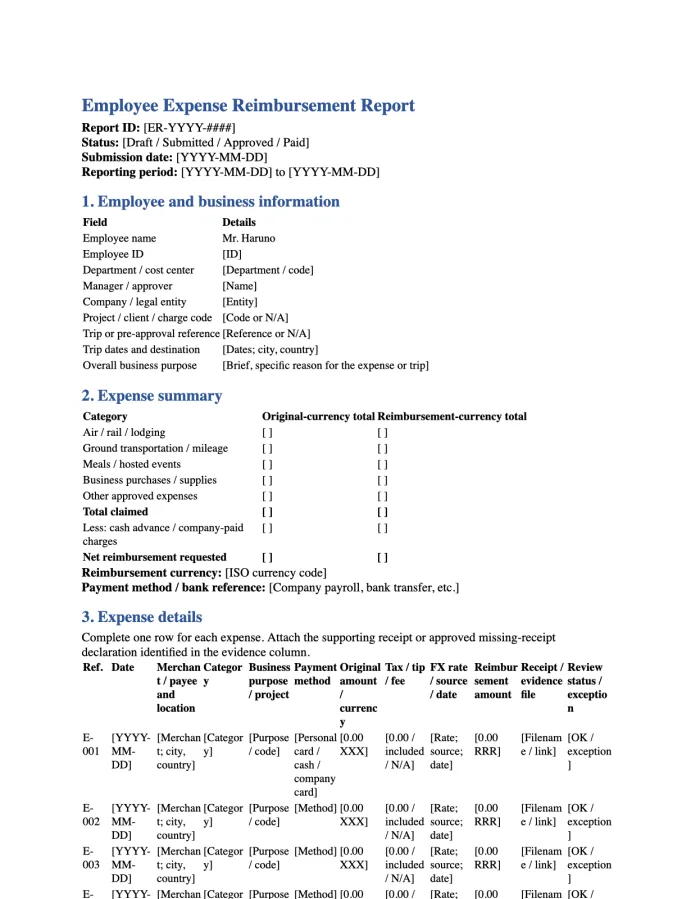
Employee Expense Reimbursement Report
A Microsoft Word template for preparing expense reports.
Download documentAsk Haruno to proceed
This simple prompt is enough for Haruno to understand what is required. But of course the more structured and detailed the prompt the less Haruno has to research or find out by itself.
How to write good prompts, read our prompts guide.
So, to call Haruno for preparing the expenses report we send a prompt:
After Haruno is done, the result is ready for your review and submission to the financial department or accounting software of your choice.
Make it run automatically
But the superpower of Haruno is automation. You do not need to repeat this manually or remember to call this prompt every month when the deadlines for financial reporting are approaching. Just create a scheduled task using the same prompt and Haruno will prepare the expense report everytime when you need it.
Haruno will perform the task and you will receive a notification when it's ready for your review.